Cowboy+
- 2.2
- Rating
- 100.00K
- Installs
- Free
- Price

 Analysis by App-foxy
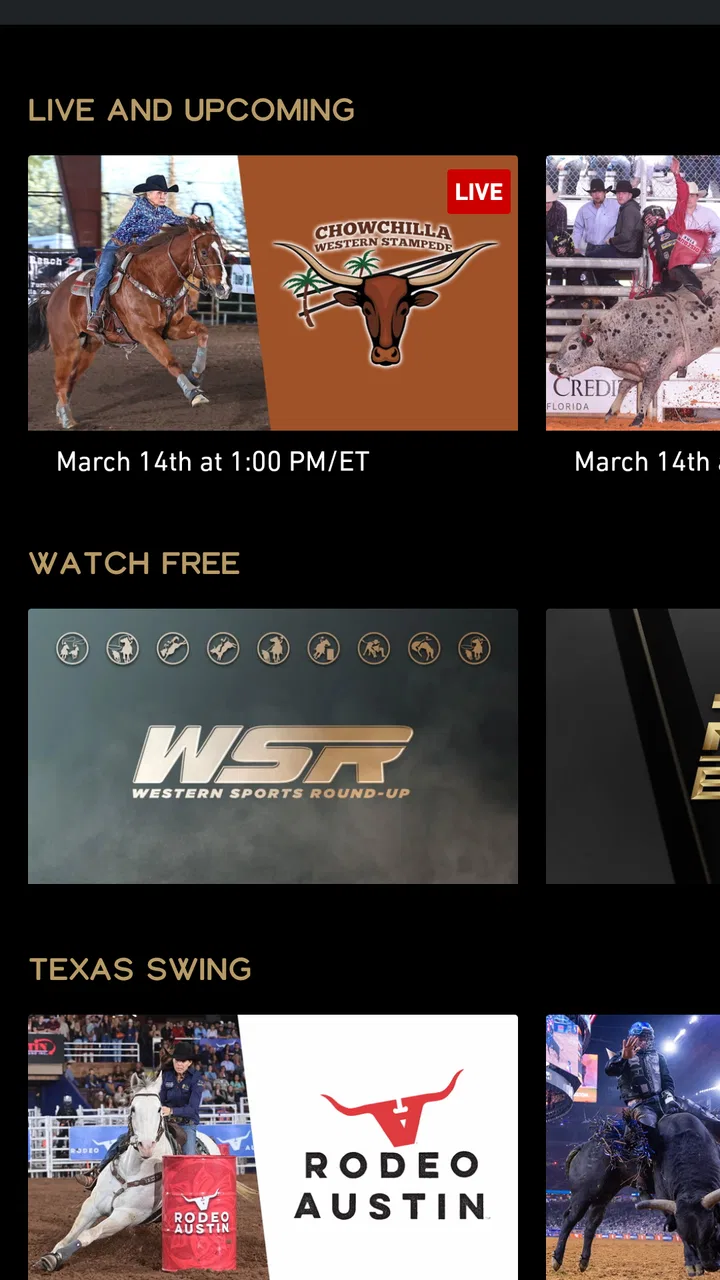
I tested Cowboy+ as a sports streaming app with one practical question in mind: does it work well when rodeo viewing is part of a household routine rather than a quick, occasional watch? My answer is mixed. The app has a clear purpose for fans of professional rodeo, especially people who want major PRCA events in one place, but the experience depends heavily on how your household shares devices, manages subscriptions, and decides who controls the account. Cowboy+ is best understood as a focused rodeo service, not a broad sports platform.
That focus is also its main appeal. Instead of asking you to search through a general entertainment service for a particular event, it puts rodeo at the center. I found that useful when I already knew what I wanted to watch. It is less compelling if your sports interests are spread across football, basketball, motorsports, and live news, because this app is built around a much narrower viewing habit.
How Cowboy+ fits into a shared household
A realistic use case is a home where one person follows rodeo closely while everyone else uses the same television for different entertainment. A parent or partner might open the app on a weekend, find a PRCA rodeo, and watch from the living room while another household member uses a phone or tablet elsewhere. In that situation, the service can be convenient because its identity is straightforward: open it for rodeo, rather than browsing a large catalog first.
You May Also Like

 Blood Strike: 2.5 Anniversary
Blood Strike’s Loadouts Turn Every Drop Into a Tactical Gamble
A close look at Blood Strike’s custom loadouts: how fast access to signature weapons reshapes its battle royale rhythm, rewards preparation, and narrows the gap between fights.

 Pandora - Music & Podcasts
Pandora’s Music Is Easy to Start, but Harder to Recover
Pandora’s strength is its low-effort path from a seed to a station. Its weak spot is how much confidence it asks you to place in connection, setup, and quiet recovery.

 8 Ball Pool
 Is Built on Rivalries, Rematches, and Routine
A close look at the rivalries, rematches, shared routines, and unanswered safety questions that turn a quick pool match into a persistent mobile community.

 Samsung Music
’s Quiet Strength Is Playing What You Already Own
Its reach comes less from spectacle than from dependable access to a personal library. That simplicity is both the app’s strongest retention engine and its ceiling.

 AccuWeather: Weather Radar
AccuWeather Review: A Quick, Clear Forecast for Everyday Decisions
For everyday plans, the best forecast is the one you can understand quickly. AccuWeather makes rain timing, radar, and local conditions easy to act on, with a few trade-offs.

 Hill Climb Racing
Why Hill Climb Racing Still Turns Crashes Into One More Run
A tiny car, a bumpy hill and one more upgrade: Hill Climb Racing keeps resurfacing because its simple chaos makes every near-miss feel personal.
More From Our News Desk



The trade-off is that a shared device turns account organization into part of the viewing experience. If several people use the same television, I would decide in advance who owns the Cowboy+ subscription and which device will normally be used for viewing. That small bit of planning avoids the common household problem of someone signing out, entering a different account, or assuming that a free app automatically means every event is free to watch.
The app itself is free to install, which makes trying the interface relatively low-risk. However, its in-app purchases range from around ten dollars to around one hundred twenty dollars per item. That wide range matters in a family setting: the person pressing a purchase button may not be the person who pays the bill. I would not hand the device to a child or guest without first explaining the account boundary and checking how purchases are handled on that device.
For a couple or family that watches rodeo together, the strongest workflow is simple. The account holder handles the subscription decision, the household agrees on the main screen for viewing, and other users treat the app as a shared service rather than creating a confusing collection of unofficial workarounds. This is not a criticism of the rodeo content; it is a practical point about using a specialized streaming app in a busy home.
What the first setup tells you
My first impression was that Cowboy+ is easy to understand because the purpose is immediately visible. The developer, TR TCC, LLC DBA The Cowboy Channel, has positioned it around access to major PRCA rodeos rather than trying to make it a general-purpose sports hub. That makes the initial decision easy: if you want rodeo, continue; if you are looking for a wide mix of sports, this is probably the wrong download.
Before installing it on a shared television, I would check the device’s operating system. The Android listing requires Android 9 or later, so an older phone, tablet, or television setup may not be suitable. This is an especially useful check in households that keep an older tablet in the kitchen or use an aging streaming device for casual viewing. A free installation does not help if the hardware cannot meet the minimum requirement.
I also recommend treating the first launch as an account-and-payment checkpoint, not merely a technical setup. Confirm which email address or account will be used, identify the person responsible for purchases, and avoid assuming that every member of the household should enter their own details. With a specialized service, the cleanest arrangement is usually one clearly managed account rather than several people trying to solve access independently.
Another useful habit is to test the app before an important event begins. Open it when nobody is waiting for the action to start, check that the intended device can run it comfortably, and make sure the account is ready. This is more valuable than discovering a sign-in or purchase issue when the family is already gathered around the television. It also gives you time to decide whether the screen size and sound setup are good enough for the type of viewing you expect.
Keeping control without making the app awkward
Because the app is aimed at everyone rather than a narrowly restricted age group, I would not treat its age label as a substitute for household judgment. The content rating is Everyone, but parents may still want to decide whether a child should browse independently, use the account, or start any paid access. The sensible boundary is not complicated: adults manage the account and purchases, while children or guests use the service only with permission.
This matters even more on a shared phone or tablet. A child may understand that the app is for rodeo but not understand that an in-app purchase can affect the household budget. I would keep the app available for viewing only after the account holder has made the necessary choices. If the device is passed between relatives, I would also say clearly whether they may watch freely, change settings, or sign out.
I did not find a reason to treat Cowboy+ like a family-management product. Its value is in rodeo access, not in solving every problem around household profiles, permissions, or scheduling. If your priority is detailed child controls, separate viewing histories, or a carefully segmented family media system, a larger platform with those tools may be a better fit. Cowboy+ can still be part of that household, but it should not be expected to replace those broader controls.
Trust also works both ways. The account holder needs to trust other users not to alter access casually, while other family members need a clear answer about what they are allowed to do. A short conversation before installation can prevent more friction than repeated troubleshooting later. In my experience, this is particularly important when one person pays for sports content that several people enjoy but only one person actively manages.
Watching rodeo with a realistic routine
The app makes the most sense for someone who follows rodeo as a recurring interest. Imagine a viewer who checks the schedule before a weekend, prepares the television, and watches a major PRCA event with family or friends. That person will likely appreciate having a dedicated destination instead of searching through unrelated sports channels or general video services.
The less obvious benefit is reduced decision fatigue. On a broad streaming platform, you may spend time asking whether an event is included, where it is located, or whether the listing belongs to a replay, clip, or live broadcast. A focused rodeo app narrows the search space. That does not guarantee a perfect experience, but it makes the starting point more obvious for a committed fan.
My practical tip is to separate “finding the event” from “watching the event.” Do the browsing and account checks earlier, then use the main viewing session only for playback. This is especially helpful when several people are waiting. It also lets you discover whether the service suits your household before anyone has planned an entire evening around it.
For casual viewers, the calculation is different. If you only watch rodeo once in a while, the free installation may be worth exploring, but the paid options deserve attention before you commit. The app’s purchase range is broad enough that an occasional viewer should compare the expected use with the cost of other ways to follow sports. A dedicated service can be excellent value for a regular fan and poor value for someone who might open it only a few times.
I would also avoid judging the app solely by how it compares with a general sports subscription. Those services may offer more variety, but they can be less direct for rodeo fans. Cowboy+ has a narrower job, and that can be a strength when the job matches your interest. The weakness appears when your household expects one subscription to cover every sport and every viewer.
What the rating suggests about expectations
The app currently has an average rating of about 2.2 from roughly four hundred ratings, with around two hundred written reviews. I would not use that score as a complete verdict, but I would take it seriously as a warning to keep expectations measured. A specialized app can have valuable content and still frustrate users through account issues, device compatibility, playback problems, or differences between what viewers expect and what they can access.
That rating also changes how I would recommend the app to a friend. I would say, “Try it if PRCA rodeos are important to you, but test it on your actual viewing device before building your routine around it.” That is more honest than presenting the service as a universally smooth sports experience. The app has a clear audience, yet the feedback history suggests that convenience should be verified in your own setup.
The install count is over one hundred thousand, which shows that the service has reached a meaningful audience without making it a mainstream replacement for every sports platform. I see that as a useful middle position: it is established enough to be recognizable to rodeo fans, but specialized enough that you should choose it for its particular content rather than for popularity alone.
The current version is 2.8.7. I would keep the app updated through the normal store process, especially before an event you care about. Updates can be important for compatibility and stability, but I would still perform the earlier device check instead of assuming that a current version guarantees a perfect result on every television, phone, or tablet.
Where it is stronger than the usual alternatives
Compared with a general sports app, Cowboy+ has a clearer identity. A rodeo follower does not need to wade through scores, leagues, and unrelated broadcasts before reaching the subject that matters. That simplicity is valuable for older relatives or less technical household members who want one recognizable place to begin.
Compared with relying on scattered clips or social media, a dedicated service is better suited to people who want a more complete viewing habit. Short clips can be useful for highlights, but they do not replace sitting down for an event. Cowboy+ is aimed at the latter kind of viewer: someone who wants rodeo to be the main activity rather than a few minutes of incidental video.
Compared with a cable package, the app may feel more focused for a household that does not want a large bundle of channels. On the other hand, cable or a broader streaming plan may be more practical when the television is shared by people with very different interests. The right choice depends less on the app alone and more on whether rodeo is a central household priority or one interest among many.
A non-obvious trade-off is that specialization improves discovery but reduces flexibility. I can find the intended type of content more directly, yet I cannot expect the same breadth of programming that a general sports service provides. That is why I would recommend it to a dedicated rodeo viewer, not automatically to an entire family that happens to include one rodeo fan.
Who should use it and who should skip it
I would recommend Cowboy+ to someone who actively follows PRCA rodeos, wants a dedicated place to look for major events, and is comfortable managing a focused sports subscription. It is also a reasonable choice for a household where one adult is willing to coordinate the account and everyone understands that the app is primarily for rodeo viewing.
I would be more cautious with a family that expects individual profiles, detailed child controls, or a single service covering many sports. The app’s Everyone rating may make it approachable, but it does not remove the need for adults to manage purchases and access. If your household needs strong separation between viewers, a broader family-oriented platform may be easier to organize.
I would also skip it if your interest is only occasional and your main goal is general sports variety. In that case, a wider service may deliver more value even if it takes longer to find a particular rodeo broadcast. Cowboy+ earns its place when its specialization saves you time often enough to justify the paid access.
One further tip is to decide whether your household wants shared viewing or individual convenience. If everyone watches together, one main screen and one responsible account holder can keep things simple. If people watch independently on several devices, clarify the arrangement before paying. Do not assume that a shared household automatically means unlimited or frictionless simultaneous use; treat access as something to organize deliberately.
My household verdict
After using Cowboy+ as a focused sports app, I see a service with a strong reason to exist but a limited audience. Its purpose is easy to understand, its rodeo focus can make event discovery simpler, and it has a natural place in homes where PRCA viewing is a regular activity. The free download lowers the barrier to trying it, while the paid purchase range means the account holder should make the financial decision carefully.
My overall recommendation is cautious but positive for the right viewer. I would install it for a committed rodeo fan, test it on the exact household device, and establish account boundaries before inviting everyone else to use it. I would not choose it as the only sports app for a mixed-interest family or as a replacement for a platform designed around broad household profiles.
The most important takeaway is that Cowboy+ works best when expectations are specific. Use it because you want a dedicated route to major PRCA rodeos, not because you expect a complete sports ecosystem. If that matches your routine, the narrow focus is useful. If it does not, the same focus becomes a limitation. For my household, that makes it a worthwhile specialist service rather than an automatic recommendation for every viewer.
FAQs for Cowboy+
01What is Cowboy+ and what can I watch on it?
Cowboy+ is a streaming service focused on Western-themed entertainment, including classic cowboy movies, modern Western films, television programs, documentaries, and related content. Its catalog may include different genres and titles depending on your location and the current licensing agreements. Before downloading, check the service description and in-app library to confirm that the type of Western content you enjoy is available in your region.
02Is Cowboy+ free to download and use?
The Cowboy+ app may be free to download, but access to its complete catalog can require a subscription, rental, purchase, or another paid option. Pricing, trial availability, and included features may vary between Android, iOS, and different countries. Review the payment details shown in the app store and inside the application before starting a trial, because subscriptions may renew automatically unless canceled.
03Does Cowboy+ support offline viewing?
Offline viewing depends on the features currently offered by Cowboy+ and on the specific title you want to watch. If downloads are supported, you generally need to save content while connected to the internet and watch it through the app rather than through a standard video player. Downloaded programs can also expire or become unavailable when licensing changes, so check each title’s download options.
04Can I watch Cowboy+ on a television or use multiple devices?
Cowboy+ may support viewing on phones and tablets, while compatibility with smart televisions, streaming devices, web browsers, casting, or multiple simultaneous screens depends on the service plan and the platform version. If watching on a larger screen is important to you, verify whether your television or streaming device is supported before subscribing. Account and device limits may also apply.
05What internet connection and permissions does Cowboy+ require?
Cowboy+ needs an internet connection for streaming, account access, catalog updates, and possibly advertisements or playback verification. A stable Wi-Fi or mobile-data connection is recommended, especially for high-quality video. The app may request permissions related to notifications, storage, or local-network and casting features. You can review or change many permissions in your device settings, although restricting some may affect certain functions.
Pros
- Immersive Western atmosphere with detailed environments and sound design.
- Simple controls make the game easy to pick up on mobile devices.
- Varied missions keep gameplay from feeling repetitive.
- Offline play is useful when traveling without a stable connection.
- Progression gives players reasons to return and improve their skills.
Cons
- Some missions can become repetitive after extended play sessions.
- The learning curve may feel steep for players new to Western games.
- Certain upgrades or content may require considerable time to unlock.
- Performance can vary on older phones and tablets.
- The game may consume noticeable storage and battery during longer sessions.

Cowboy+
Gallery